
Install Tcptrack to monitor TCP connections | RHEL/CentOS
Tcptrack is an excellent tool to monitor your server network connections and bandwidth quickly, installation is pretty easy and can be done either via rpm or source.
Install Tcptrack from rpm
Download Tcptrack rpm from http://packages.sw.be/tcptrack/ by selecting your OS and arch :
- cd /usr/src
- wget http://packages.sw.be/tcptrack/tcptrack-1.1.5-1.2.el5.rf.i386.rpm
- rpm -ivh tcptrack-1.1.5-1.2.el5.rf.i386.rpm
Install TCPtrack from source
Download TCPtrack source from : http://www.rhythm.cx/~steve/devel/tcptrack/release/
- tar zxvf tcptrack-1.3.0.tar.gz
- cd tcptrack-1.3.0
- ./configure ; make & make install
Run ‘ tcptrack -h ‘ to list help menu :
Usage: tcptrack [-dfhvp] [-r <seconds>] -i <interface> [<filter expression>]
TCPtrack can monitor only one nic at once with only one parameter to run (if you have two nic ie.. eth0 & eth1 )
- # tcptrack -i eth0
- # tcptrack -i eth1
Tcptrack can also take a pcap filter expression as an argument. The format of this filter expression is the same as that of tcpdump(8) and other libpcap-based sniffers. The following example will only show connections from host 68.36.45.78:
- # tcptrack -i eth0 src or dst 68.36.45.78
To monitor the specific ports (ie..port 80 and 22):
- # tcptrack -i eth0 port 80
- # tcptrack -i eth0 port 22
Tcptrack is little resouce intensive, try to use -f option for fast average recalculation under less resource usage.
Externel links :
Tcptrack official website :
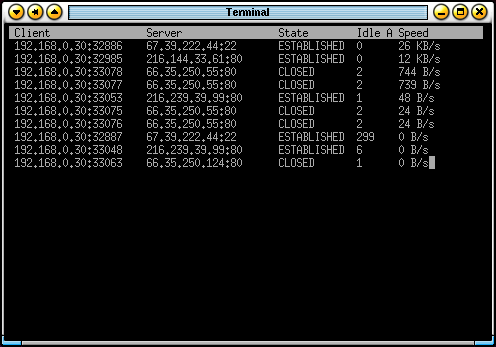
TcpTrack