LXD is an open source container management extension for Linux Containers (LXC). LXD both improves upon existing LXC features and provides new features and functionality to build and manage Linux containers.
The core of LXD is a privileged daemon which exposes a REST API over a local unix socket as well as over the network (if enabled). LXD isn’t a rewrite of LXC, in fact it’s building on top of LXC to provide a new, better user experience. Under the hood, LXD uses LXC through liblxc and its Go binding to create and manage the containers.
LXD is typically added to the Linux kernel. Packaged LXD distributions are available for numerous Linux distributions, including Fedora, Debian, openSUSE, Ubuntu, Alpine Linux, Arch Linux and Gentoo. Users can also obtain LXD builds for Windows and macOS.
The LXD project was founded and is currently led by Canonical Ltd with contributions from a range of other companies and individual contributors.
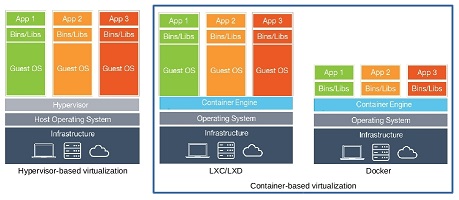
lxd container hypervisor
Features
- Secure by design (unprivileged containers, resource restrictions and much more)
- Scalable (from containers on your laptop to thousands of compute nodes)
- Intuitive (simple, clear API and crisp command line experience)
- Image based (with a wide variety of Linux distributions published daily)
- Support for Cross-host container and image transfer (including live migration with CRIU)
- Advanced resource control (cpu, memory, network I/O, block I/O, disk usage and kernel resources)
- Device passthrough (USB, GPU, unix character and block devices, NICs, disks and paths)
- Network management (bridge creation and configuration, cross-host tunnels, …)
- Storage management (support for multiple storage backends, storage pools and storage volumes)
LXD Installation
LXD has two kinds of releases,
LTS releases
Feature releases
LTS releases are recommended for production environments as they will benefit from regular bugfix and security updates, it will not available any new features added or any kind of behavioral change. To get all the latest features and monthly updates to LXD, use the feature release
In this tutorial, you will learn to set up and use LXD (Linux container hypervisor) https://linuxcontainers.org/lxd/getting-started-cli/